The Changes view shows the code a window of Git history edited. Use it after a coding session to answer three questions: where did the work happen, what changed in the shape of the code, and what should you review first. A window changes which code is visible. It does not recolor a map of the whole repository.
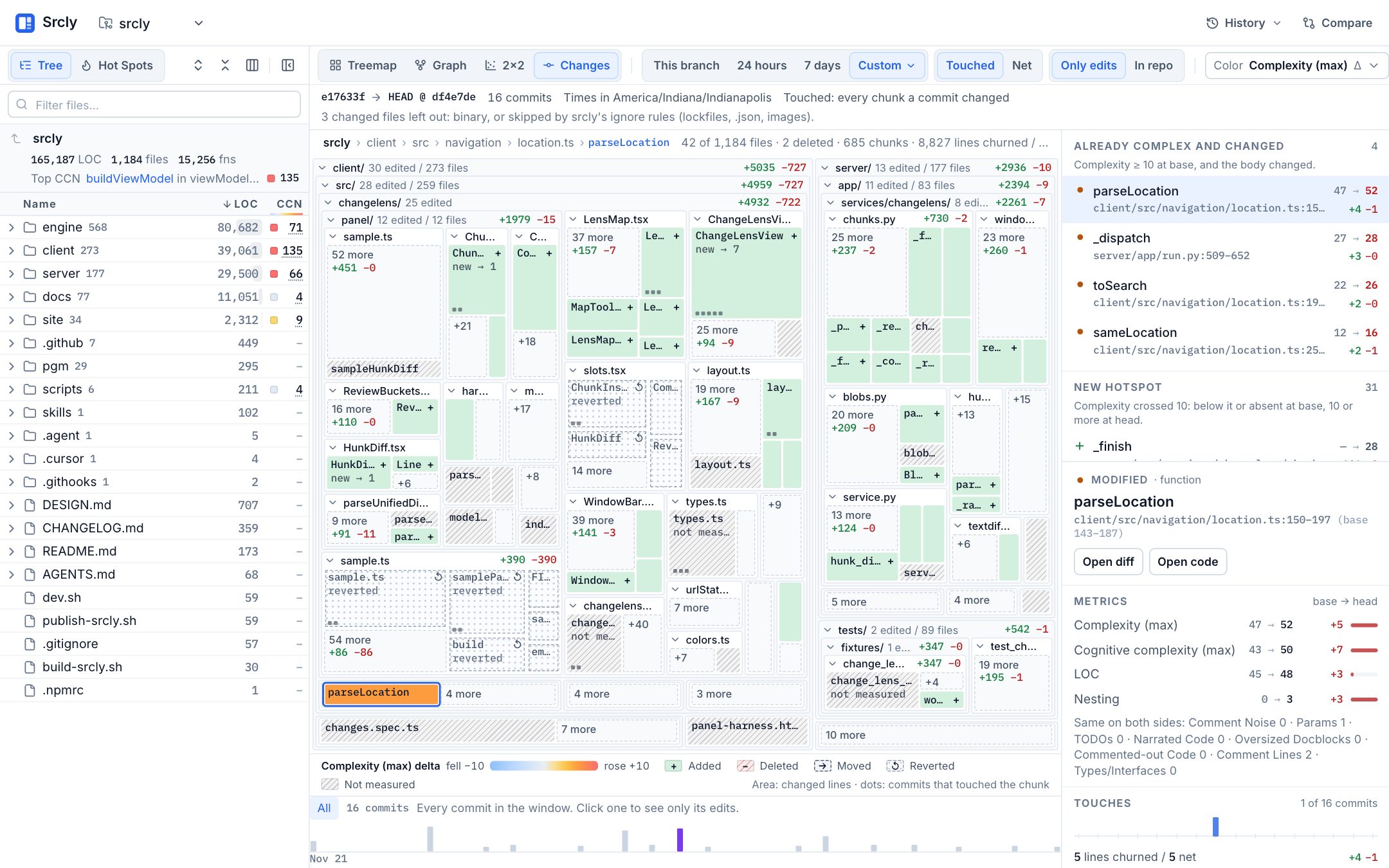
parseLocation is selected: its complexity went from 47 to 52, so it is in Already complex and changed.Open the view
- Analyze a folder inside a Git repository.
- Select Changes beside Treemap, Graph and 2×2.
- Pick a window: This branch, 24 hours, 7 days, or Custom.
- Select a chunk on the map or in the review lists, then select Open diff.
The status line under the toolbar shows the resolved base and head, the number of commits, the time limits with the time zone, and any notes. Read it first: it tells you exactly which history you are looking at.
The view reads the checked-out branch. Staged and unstaged edits are included as one Working tree entry after the last commit. To read other revisions, use Custom and enter a base and a head (a branch, tag or sha), or a time range.
Windows
- This branch compares the branch with the commit where it left the default branch (the merge base). On the default branch itself, the base is the upstream tip. When the two are equal, the window is empty and a note says so.
- 24 hours and 7 days read the commits whose committer date falls in that time, counted back from now. The base is the first parent of the oldest commit in the window.
Off the default branch
When the checkout is on another branch, or on the default branch but behind its upstream, the status row names the branch and how far it is behind and ahead of the default branch (origin/main when it exists and is not behind local main). A time window then gets a History toggle: Branch reads the checked-out branch, and origin/main reads the default branch's commits. Srcly reads Git objects only. It never checks out a branch or touches the working tree, so main history leaves out uncommitted edits.
When the branch has no commits in a time window, the window reads the default branch and a note says so. Pick Branch to go back. When a window on the branch is empty and the default branch has commits in the same time (the last 7 days for This branch), the empty view offers a button that shows them. This branch always compares the branch with its merge base.
- Custom takes two revisions, a time range, or both.
Srcly reads one history: the first-parent log of the branch. A merge commit counts once, as its diff against its first parent, so merged work is never counted twice and other branches never mix in. A merge of the default branch into your branch is listed but not read, because those are upstream changes. A note names it. When the base is older than such a merge, "before" is the base with that merge's changes applied, so upstream work never reads as yours. If the merge overlaps your own earlier edits, the base stays as it is and a note says so. On the default branch itself, no merge is an upstream merge.
A window keeps its newest 200 commits. A time window reads at most the newest 5,000 commits to find its start, and a note says when that cuts it short. In a shallow clone, Srcly never reads past the oldest commit the clone holds, and a note says so. Binary files and files that Srcly's ignore rules skip (lockfiles, .json, images) are left out, and a note gives their count.
Touched and Net
Touched is the default. It shows every chunk that any commit in the window changed. Net compares the base snapshot with the head snapshot.
The two differ when work was tried and put back. A function that a commit changed and a later commit restored is reverted in Touched: it is drawn with dots and a ↺ mark. In Net it is gone, because the base and the head are equal. Use Touched to see where the session went. Use Net to review what will land.
What a chunk is
A chunk is the unit the map draws. Srcly parses each changed file on both sides with the same analyzer the scan uses, then groups hunks this way:
- A hunk belongs to the innermost named function, method or class that holds its lines. A callback or object literal with no name belongs to the named scope around it. Nested names are qualified, such as
Class.method. - Comment and decorator lines right above a function or method belong to it, not to the class around it.
- Hunks outside every named scope form one file-level chunk for that file.
- In Markdown, a hunk belongs to its nearest heading section.
- In a file no analyzer reads (YAML, CSS, shell), nearby hunks form one line-range chunk.
- A generated or vendored file is one chunk and is not analyzed. So is an empty file that was added or deleted.
- A file that does not parse at the base or the head gets no symbols. Its chunks say Syntax error, and a note names the file.
Srcly never invents a symbol. A chunk with no analyzer says not measured, never 0. So do heading and file-level chunks: no code metric applies to them.
Head and base chunks pair by path and name. When Git reports a renamed file, they pair by name across the two paths. Two scopes with the same name in one file pair by body: identical first, then closest. A symbol that left one file and appeared in another with a near-identical body is moved. A weaker guess is labeled uncertain, and so is a Markdown heading that was reworded above the same text. A file added in the window has no base, even when a renamed file held that path before. A line-number overlap alone is never a match. A pure rename with an unchanged body has equal before and after values: it is not an improvement or a regression.
Read the map
Only edits packs the edited chunks together, grouped by folder and then file. Tile area is changed lines, with a floor so a one-line edit can still be selected. A folder label reads like 5 edited / 43 files · mostly tests. Select a folder or file name to zoom; use the breadcrumbs to go back up. The chevron folds a group into one tile without moving its neighbours.
In a long window, each file keeps its largest chunks open and pools the smaller ones into one N more tile. Select a pool to open it. A chunk you select from a list leaves its pool.
In repo returns to the familiar file map, sized by file LOC. Untouched files are muted, and each edited chunk is a band at its lines in its file. The selection stays when you switch.
The Color menu picks a metric and Now (the value at head) or Δ (the change in the window). Delta uses a diverging scale: blue fell, orange rose. Added, deleted, moved, reverted and not-measured chunks each have their own fill and mark. A color change keeps the layout and the selection.
Review first
The panel lists two review buckets. They are plain rules, not a score:
- Already complex and changed: the chunk had cyclomatic complexity of 10 or more at base, and its body changed.
- New hotspot: the chunk crossed the line in the window. Its complexity is 10 or more at head, and at base it was below 10 or the chunk did not exist. A chunk that was already at 10 or more is only in the first bucket.
Test, docs, generated and vendored files get no bucket. All edits lists every chunk, most lines churned first, with status and file-class filters.
Inspect a chunk
The inspector shows the chunk's status, where it is, and each metric as base → head. Metrics that did not change fold into one line. Touches places one mark per commit that changed the chunk on the window's timeline, with churned lines against net lines. Six edits to one handler and one edit each to six handlers are different stories, and this is where you see which one you have.
Open diff shows only the chunk's own lines. Changed lines of a nested named scope are in that scope's diff, not in its parent's. A symbol's diff compares its body on the two sides, so a moved symbol shows only what changed in it. Select a touch mark to see that one commit's diff.
Step through commits
The commit rail under the map shows the window's commits on a compressed time axis, sized by lines changed. Commits that touched the selected chunk are highlighted. Select a commit to dim every chunk it did not change. With a commit selected, Open diff shows that commit's hunk. Select All or the commit again to clear it. The left and right arrow keys step through commits.
From the command line
srcly changes prints the same result as Markdown: the resolved selection, the review buckets, then the chunks grouped by folder with before → after complexity.
uvx srcly changes
uvx srcly changes . --window 7d --mode net
uvx srcly changes . --window custom --base main --head my-branch --json
See Command line for every flag.
What it does not claim
The view shows commits and local edits. It does not show who read a file or which tool made an edit, and it never credits an agent with a read or an edit. A complexity change is a structural signal to inspect, not a verdict on the change.